Reception Playbook — Level 1 Hub
Breakthrough ADHD Center · Internal Reference · Phase 1 (May 2026)
Open this page every shift. Start with the Map above to orient yourself — the rest of this page lives at your fingertips.
The full Reception Playbook (5 artifact types):
- The Hub — this page; the home base. Open every shift.
- Quick-Reference Cards —
reception_cards_pack.pdf+ individual PNGs incards/. Pull one when the phone is ringing. - Decision Flowcharts —
reception_flowcharts_pack.pdf+ individual PNGs inflowcharts/. Visual decision trees for branching situations. - Reference Sheet —
reference_sheet.xlsx(upload to Google Sheets). Source of truth for clinician schedules, Zoom links, holidays, contacts, glossary. - Training Book —
training_book.docx. Six-week progressive curriculum for new hires (Week 1 → Week 6).
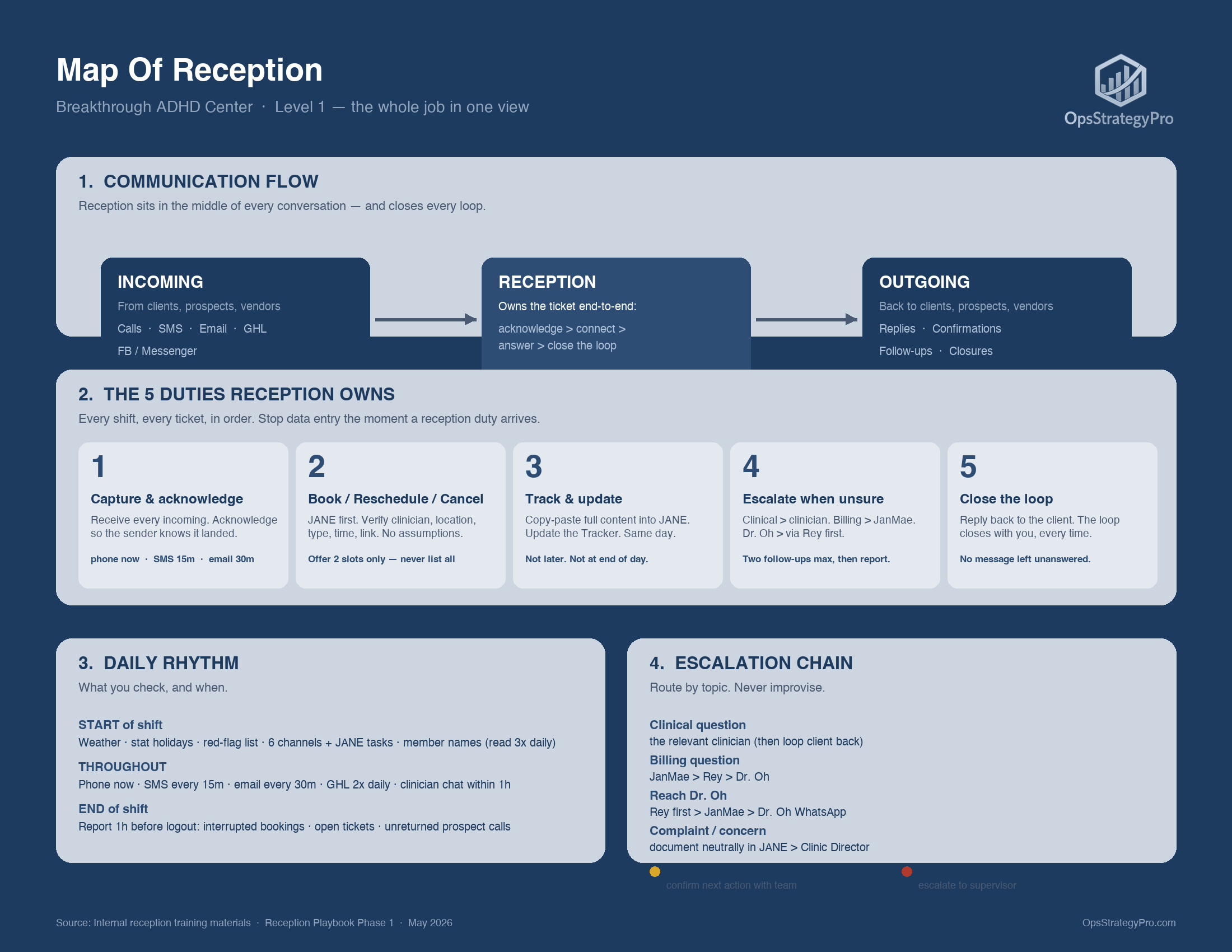
Start of shift
- ☐ Check BC weather today
- ☐ Check stat holiday today / upcoming
- ☐ Noise cancellation OFF, microphone working
- ☐ Read sent emails from the previous shift
- ☐ Read summaries of calls from the off-shift period
- ☐ Check all 6 channels: clinician chats · group chats · SMS · Zoom phone · new emails · GHL
- ☐ Check JANE tasks queue
- ☐ Read full BAC daily tracker — know who is in the queue
- ☐ Read member names list (3× daily — know their family)
- ☐ CRITICAL: review consent forms first
- ☐ Review Red Flag list for Dr. Oh
- ☐ Check for any emails/calls with no reply >24h
Throughout the shift
- Phone calls — answer now; missed = call right back immediately
- SMS — check every 15 minutes
- Email (Hushmail) — check every 30 minutes; booking emails replied within 30 min
- GHL — morning check + afternoon check
- Clinician chats — reply within 1 hour
- JANE & Tracker — update immediately after every communication (not at end of day)
- Every communication: copy-paste full content into the JANE note. Do not summarize only.
End of shift (1 hour before logout)
- ☐ Total interrupted member bookings
- ☐ Total interrupted bookings / cancellations
- ☐ Open issue cases: complaints, billing, booking, pricing, document requests
- ☐ Total unreturned prospect calls
- ☐ Anything over 48h flagged for next shift
-
PRIVACY & GUARDIANSHIP. Never share client information unless the contact is confirmed and approved in JANE. For custody / kidnapping-risk cases, JANE notes list all approved contacts — no exceptions. Always verify guardianship before speaking about a child.
-
NO DIAGNOSIS · NO TREATMENT CLAIMS · NO GUARANTEES. Never use diagnosis language, treatment claims, guarantee language, or informal reassurances. Never speculate. Escalate to Clinic Director if unsure — never improvise.
-
COPY-PASTE FULL CONTENT INTO JANE. Same day, after every communication. Emails, SMS, phone summaries, voicemails, booking changes, instructions received. Do not summarize only.
-
NEVER DELETE APPOINTMENTS. Always mark: No Show, Cancelled (with reason), or Rescheduled. Do not determine the fee — Clinic Director decides.
-
FAMILY-BOOKING CANCELLATION CHECK. We use family booking. When a client cancels, check ALL children and parents linked to the family. Cancelling only one child leaves uncancelled hours the clinic still pays for.
| When this happens... | Open |
|---|---|
| The phone rings (any call) | Card 01 — Phone Intro & Tone |
| A client asks to book or reschedule | Card 02 — Booking & Rescheduling |
| A client wants to cancel | Card 03 + Flowchart 01 — Cancellation Triage |
| A new (non-client) call or email comes in | Card 04 + Flowchart 03 — New Inquiry |
| A client expresses dissatisfaction (direct or indirect) | Card 05 — Complaint Handling |
| A client asks about money, invoice, insurance, or charges | Card 06 — Billing Question |
| A client wants a slot but clinicians are full / out-of-shift | Card 07 — No Slots / Waitlist |
| A client wants to pick up a package, device, or supplement | Card 08 + Flowchart 05 — Pickup Coordination |
| You're about to do something and aren't sure if Level 1 can | Card 09 — What Level 1 CANNOT Do |
| Sending an SMS, or about to follow up again | Card 10 — SMS Safety & Follow-Up Max-2 |
| A new client was booked — consent form timeline | Flowchart 02 — Consent Form Timing |
| You need to escalate something and aren't sure who to | Flowchart 04 — Escalation Chain by Topic |
| Schedule, no-show policy, or Zoom link for a clinician | Reference Sheet — Clinicians / Zoom Links tabs |
| Which date is a stat holiday | Reference Sheet — BC Stat Holidays tab |
| You're a new hire learning the role | Training Book — Week 1 → Week 6 |
Escalation chain
| Topic | Route |
|---|---|
| Clinical question | The relevant clinician (then loop client back) |
| Billing question | JanMae > Rey > Dr. Oh |
| Reach Dr. Oh | Rey first > JanMae > Dr. Oh WhatsApp |
| Complaint / concern | Document neutrally in JANE > Clinic Director |
| Stuck >24h | Yellow flag — confirm next action with the team |
| Stuck >48h | Red flag — escalate to supervisor immediately |
How to reach Dr. Oh — specific protocol
- If Rey is on shift and available: contact Rey first.
- If Rey is out of shift: contact JanMae.
- If both are out: contact Dr. Oh via WhatsApp.
- Always check JANE before calling Dr. Oh — if she has a client session in progress, do not call. If she is in a general meeting (no client in JANE), you may still call — she may answer.
Building reception — Vancouver (Spaces, West Avenue)
- Reception contact: Nadia
- Phone: (604) 332-8969
- Email: reception.westavenue@spacesworks.com
- When the Vancouver intercom calls you, press 6 on your dialpad to buzz the visitor in
- Elevator does not work on weekends — clinician greets at the lobby
Building reception — Langley (Regus, 201st Street)
- Phone: 604-546-7400
- Email: langley.201ststreet@regus.com
- When the Langley intercom calls you, press 9 on your dialpad to buzz the visitor in
- Client waits on the 2nd floor; clinician receives them
Leave / Emergency ticket (where to send)
- Email: hello@breakthroughadhd.com + healthyliving101@icloud.com
- Include: date of leave · reason · who will cover · make-up shift
- Get written permission
| Term | Meaning |
|---|---|
| JANE | Primary booking + documentation system. All bookings, notes, and tasks live here. |
| GHL (GoHighLevel) | Secondary email / SMS channel — morning + afternoon check, 2× daily |
| Hushmail | Primary email system — hello@breakthroughadhd.com |
| Zoom SMS / Phone | The clinic reception call + SMS line |
| BAC daily tracker | The daily queue / status board, separate from JANE |
| Onboarding tracker | Specific to new clients — separate from the BAC daily tracker |
| MB (PC) | Member Booking (pre-paid / pre-covered) — distinct from private pay |
| Member client | Pre-paid, scheduled monthly. Member care is priority. Permanent Zoom links used. |
| Private pay | Pay per session. Different appointment types from members. |
| Intake session | The very first appointment only — never re-used for follow-ups |
| Family booking | Multiple family members linked. Cancellations must check ALL members. |
| Yellow flag / Red flag | 24h / 48h ticket-unresolved escalations — see chain above |
| 2-hour guarantee | A single in-person on an empty shift triggers this payment — never book without Dr. Oh's approval |
| Permanent Zoom link | Used for member clients only (Dr. Oh, Dr. Laurel, Dr. Veronica, Igor, Farzana) |
| Intercom buzz-in | When the building intercom calls reception, press 6 (Vancouver) or 9 (Langley) on your dialpad to admit the visitor |
Source: distilled from the 16-document ONE PAGE COLLECTION (May 2026). Internal use only — not for distribution outside the clinic.